 MacArchive
In short
.dmg (button below)Requirements
| Mac | Apple silicon (M1 or newer) |
| macOS | macOS 11 Big Sur or newer (developed on a current macOS release) |
| Disk space | about 445 MB for the download, about 350 MB installed |
| Memory | 8 GB is enough for drawing. The AI model needs more: about 6 GB free for an 8B model, about 10 GB for a 14B model. |
| Internet | only for the download and for getting an AI model once |
Download the disk image
MacCAD-2027-3D-1.0.0-arm64.dmgDownload .dmgSHA-256 68ebf1c4b4419fc6c6f9a6e4a0688ad4f22e20a5d10178d6a3690e6907e2b2c9Check the download (optional but recommended)
Open Terminal and run this. The result must be identical to the SHA-256 above.
shasum -a 256 ~/Downloads/MacCAD-2027-3D-1.0.0-arm64.dmgA different value means the file is damaged or was changed. Do not install it. Download it again.
Copy the app to Applications
Double-click the
.dmg. A window opens: drag MacCAD 2027 onto the Applications folder. Then eject the disk image (right-click the disk in Finder, Eject).Open it the first time
MacCAD is not signed with an Apple Developer certificate, so macOS stops it once with "Apple could not verify ... is free of malware". This is expected. Do one of these:
- Open MacCAD 2027 from Applications (it is blocked). Open System Settings → Privacy & Security, scroll to Security, click Open Anyway next to "MacCAD 2027", then confirm with your password or Touch ID.
- Or in Terminal, remove the download mark and start it:
xattr -cr "/Applications/MacCAD 2027.app"
open "/Applications/MacCAD 2027.app"
You only do this once. Later starts are normal.
Try it out
Choose File → Open (⌘O) and pick a
.mcad,.dwgor.stepfile. You can select several files; each opens in its own tab. A STEP file opens as a new drawing that holds its solids.- Type
3Dto turn a solid drawing into a 3D view andFSto send the 3D view to 2D lines. - Type
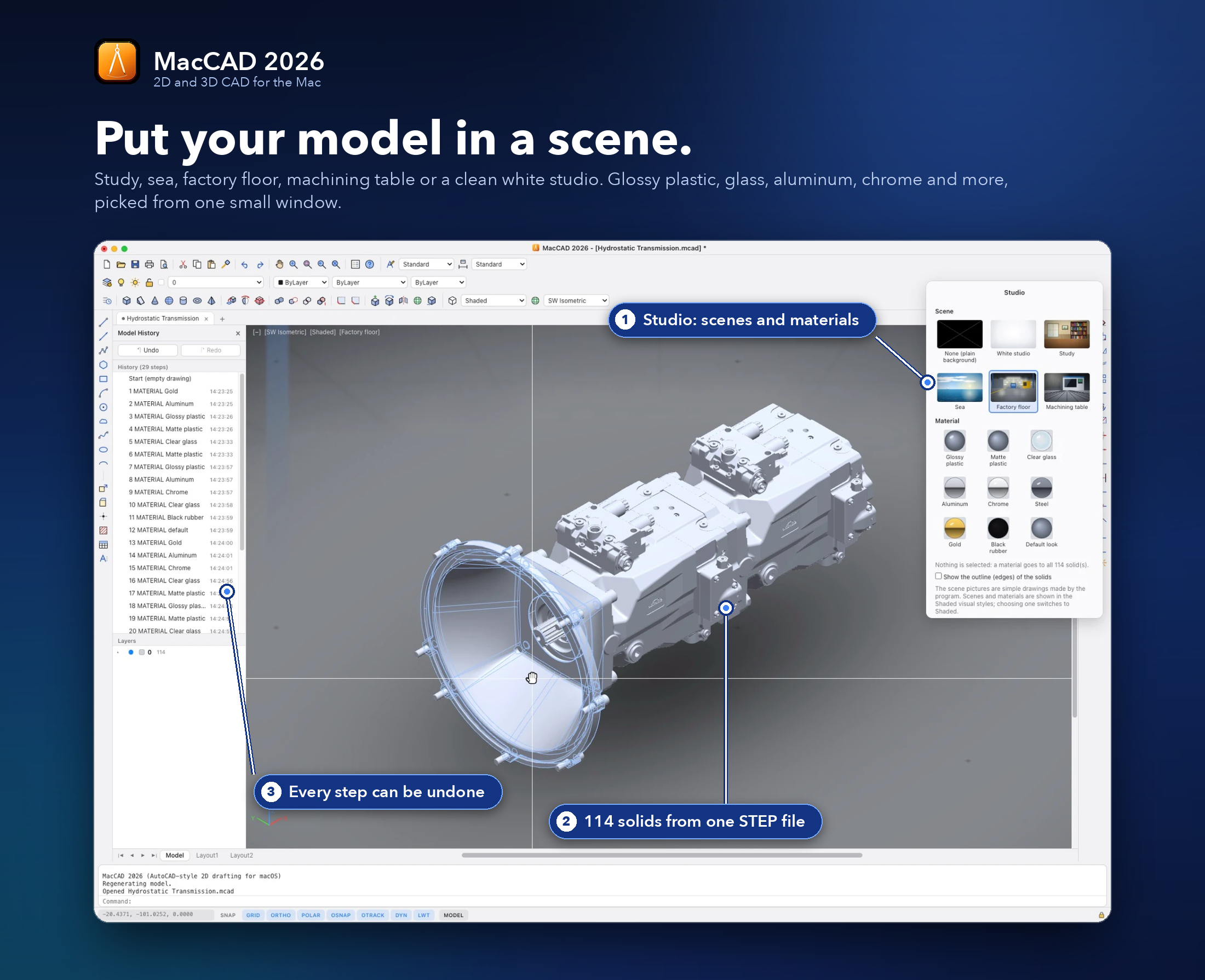
STUDIOto put a 3D model in a scene (study, sea, factory floor, machining table, white studio) and give it a material (glossy plastic, glass, aluminum, chrome and more). - Hold ⌘ and scroll to turn the 3D model. Select parts and press ⌘B to hide them, ⇧⌘B to swap hidden and shown parts, ⇧⌘U to show all.
HELPopens the shortcut list and the manuals.
- Type
The 15-day trial and the licence key
Everything works for 15 days from the first start. The days left are shown at the right end of the status bar. After that MacCAD is view-only (you can open, look at and measure drawings, but not change, save or export them) until you enter a licence key: Help → Licence and Trial..., or type
LICENSE, paste the key and press Activate. The key is checked on your Mac; nothing is sent over the internet. A key works on one computer: the licence window shows its Computer ID, and the Get a key button opens an e-mail to [email protected] that already contains it (the ID is a scrambled number and is sent only if you send that e-mail).Optional: set up the AI (local, free)
The AI window (
AI) needs a language model running on your Mac. It never uses the internet for your drawings.- Install Ollama from ollama.com and start it.
- In Terminal, get a model once (about 5 GB):
ollama pull qwen3:8b - In MacCAD type
AI. The top line must say Connected | model: qwen3:8b. Write what you want to build, for example "flange, diameter 80, 12 thick, centre hole 40, six holes of 8 on a 60 circle".
Other servers that speak the OpenAI protocol (LM Studio, llama.cpp) work too: set the address in
AI→ Settings. If a server needs an API key, put it in the environment variableOPENAI_API_KEY; MacCAD does not store keys.
Problems
| "MacCAD 2027 is damaged and can’t be opened" | The download mark blocks it. Run xattr -cr "/Applications/MacCAD 2027.app" and open it again. |
| "You can’t open the application ... because it is in the Trash" | An older copy of MacCAD is still in the Trash, and Spotlight, Launchpad or an old Dock icon is pointing at it. Empty the Trash, drag the old MacCAD icon out of the Dock, then open MacCAD 2027 from Finder → Applications. If it is not in Applications, drag it there again from the disk image. |
| The AI window says "Not connected" | Ollama is not running. Start the Ollama app, then close and reopen the AI window. |
| The AI answer is wrong | Use the Change box ("make the holes diameter 10"), pick a bigger model (qwen3:14b is slower), or use Show plan to correct a number by hand. |
| Solids do not show for a second after opening | The 3D engine loads in the background the first time a drawing with solids is opened. |
| Text looks different from AutoCAD | MacCAD draws text with macOS fonts; SHX fonts are replaced by similar fonts. |
Uninstall
Drag MacCAD 2027 from Applications to the Bin. Settings and the AI log live in ~/Library/Application Support/MacCAD 2027; delete that folder as well if you want no trace.